
The Eight Checks in a PPC Audit, in the Order That Matters
· 12 min read
Most PPC audits hand you 50 things to fix and no way to rank them. Here are the eight checks worth running, in the order that stops you fixing the wrong thing.

A PPC audit is a structured review of a paid search account that finds where the money is going wrong and turns that into a short list of changes. Eight checks cover almost all of it. The order they run in matters more than the list, because most of them mean nothing until the one before is clean.
The complaint that comes up again and again in r/PPC is not that the checklists are wrong. It is that every one of them makes it sound like there are 50 ways to waste spend, and none says which to look at first.
Why the order matters more than the list
Run the checks in the wrong order and you will spend a week fixing something that was never the problem. Tracking sits first because every judgement downstream depends on it. Keywords sit second because they tell you what is producing business. Everything after that is refinement of an account you now understand.
Here is what goes wrong without an order. An audit flags a keyword with a Quality Score of 3 and recommends pausing it. Sensible on the face of it. But if conversion tracking is misfiring, or nobody has joined leads back to keywords, that recommendation is built on a number that describes click cost and nothing else.
We have made that exact mistake, and it turns up in check 2.
- 1
Verify the measurement
Confirm the account records real business outcomes before you read a single performance number. - 2
Find what produces business
Join actual leads back to the keywords that made them. This is where the surprises live. - 3
Map the waste
Search terms, budget, settings. Now that you know what works, you can see what is competing with it. - 4
Refine the inputs
Bidding, ad copy, landing pages. These are improvements, not diagnoses.
Check 1: is conversion tracking measuring a real business outcome
Open your conversion actions and read what each one actually counts. A page load is not an enquiry. A form view is not a form submission. If any action fires on something a visitor can do by accident, every performance number in the account is inflated and the bidding algorithm has been trained on it.
What each action counts
Click into the action and read its trigger. Page-load events on a thank-you page are the classic offender, because that page can also be reached by an internal link or a refresh, and every one of those counts.
Whether it is primary or secondary
Only primary conversions feed bidding. A goal set to secondary reports in the All conversions column and nowhere else. That is why an account can genuinely be receiving conversions and still show zero in the column everyone reads.
Whether it is duplicated
Two actions counting the same event will not break anything visibly. It will just make everything look twice as good as it is.
The complaint about dashboards full of clicks and no real pipeline is usually a tracking failure, whether or not the person raising it knows that. The dashboard was measuring the wrong thing accurately.
Check 2: which keywords actually produced the leads
This is the check almost every audit skips, and it is the one most likely to change a decision. Take your recent leads, however you record them, and join each one back to the exact keyword that produced it. Not the campaign. The keyword. No dashboard does this for you.
On one client account we ran an exhaustive audit, every report and every column. The thing that changed a decision was not in any of them.
Every single lead had come from a phrase match keyword. Not one came from exact match.
One keyword we had lined up to pause three separate times carried a Quality Score of 3 and was eating over half the budget. It had produced more leads than any other keyword in the account, at a lower cost per lead than the ad group average.
Meanwhile the tidy exact match keywords had spent real money and produced nothing.
Quality Score tells you what a click costs. It does not tell you what produces business.
Most audits stop at the score because the score is right there on the screen, and the join back to outcomes takes actual work. Do the work.
If you only ever check one thing in an ad account, check which keywords produced the leads rather than which keywords look healthy. It takes an afternoon with a spreadsheet and it will contradict something you believe.
Check 3: how much of your spend has no visible search term
Pull the search terms report and compare the spend it shows against the total spend for the same period. The gap is the money that went to searches Google will not name for you. On most accounts the gap is large, and it changes what the report is for.
This matters because everyone treats the search terms report as a full picture you can prune. It is a sample.
We pulled the full report on a live account and only 22% of the spend had a visible query attached. The other 78%, and about four fifths of the clicks, went to searches Google will not show us. We checked it was real rather than a reporting lag. It was.
That account is at the extreme end, and we would rather say so than round it off. On a second account we checked while writing this, the search terms report accounted for a little under half the spend for the same period. The direction generalises. Our 78% does not.
Collin Slattery of Taikun Digital analysed nearly 14 million clicks across 933 campaigns, covering more than $20 million in ad spend. He found 26.7% of search spend hidden on average, ranging from 12.6% to 73.3% by account. Hidden queries also carried 52% higher cost per click and 44% lower click-through rates than visible ones. Search Engine Land reported it in July 2025.
52%
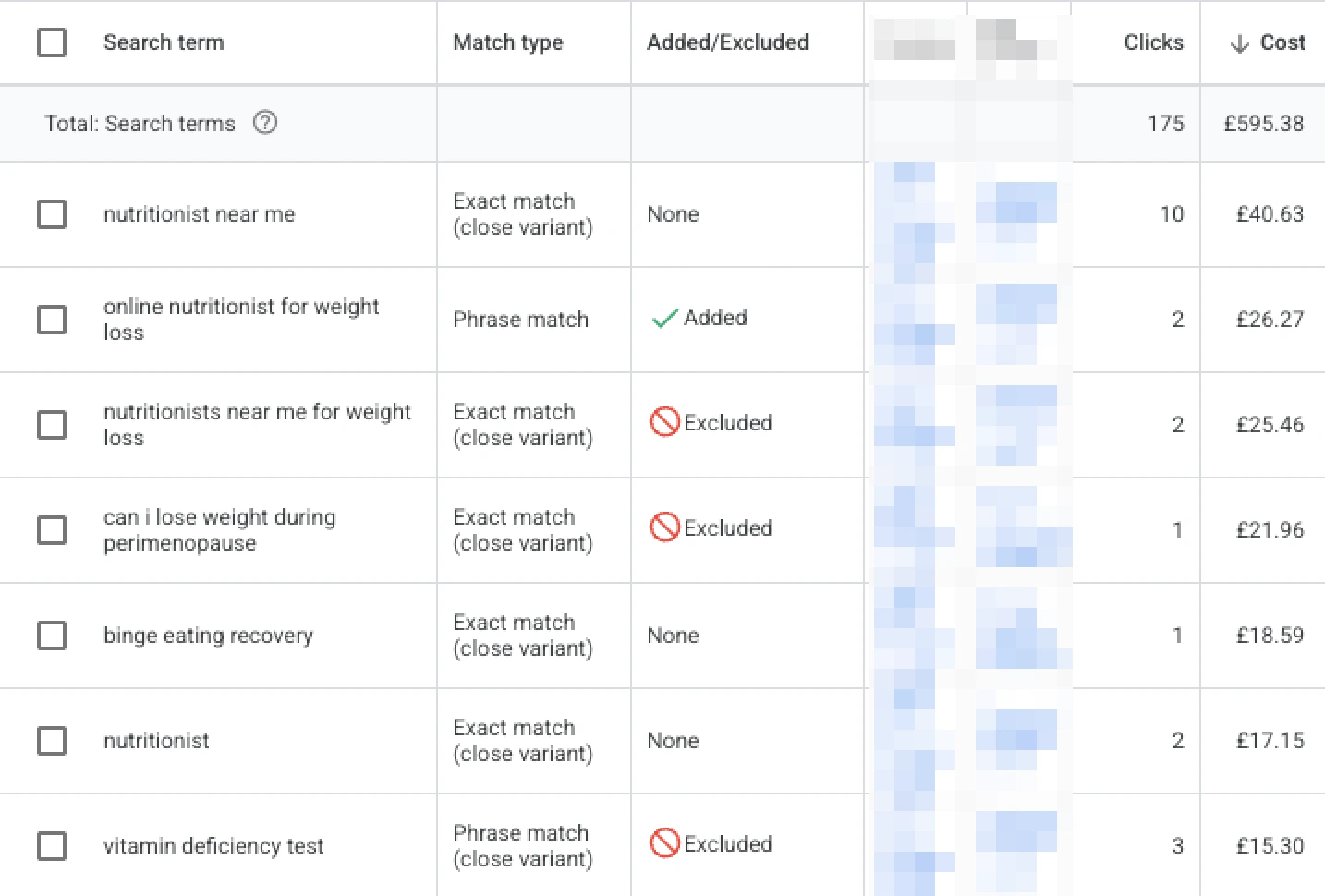
That is the second account, sorted by cost. The total at the top is everything the report can see. Set it against what the account actually spent over the same dates and a little under half the money has a query attached to it.
Two consequences follow, and both are practical.
Stop saying there is nothing left to negate. That statement only ever covers the fraction of spend you can read, and your negative keyword list can only block what you can see.
Then judge waste at keyword level on cost per lead, rather than at query level on whatever happens to be visible. The keyword number covers all the spend attached to it. The query number does not.
None of this means the search terms report is useless. It still catches the obviously wrong searches, and on a small account that is often several hundred pounds a month. It just is not the audit's ceiling.
Check 4: can your conversion volume support the bidding strategy
Look at how many conversions the account records in a rolling 30 days, then check that number against what your bidding strategy needs. The working threshold most practitioners use is around 15 conversions in 30 days, with 30 being comfortable. Google does not publish a hard floor, so treat it as a rule of thumb rather than a rule.
People argue about bidding strategies as though you get a free choice. You do not. Do the division and the choice often makes itself.
| Cost per conversion | Spend for 15 | Spend for 30 |
|---|---|---|
| 50 | 750 | 1,500 |
| 150 | 2,250 | 4,500 |
| 340 | 5,100 | 10,200 |
The arithmetic is the whole point. On one account we run, a conversion costs roughly £340 at the time of writing, August 2026. 15 of those is about £5,000 a month in ad spend and 30 is north of £10,000. Most advertisers at that cost per conversion will never clear the threshold.
So on that account the conversion-based strategy is very likely never available. Maximise clicks with a hard cap on cost per click is not a beginner setting there. It is the correct permanent one.
The practical consequence is that everything then rests on conversion rate rather than conversion count, because the count is never going to arrive.
An audit that recommends switching to Maximise Conversions without checking whether the account can feed it has recommended a worse account. That recommendation appears constantly, because it sounds like progress.
Check 5: is Google scoring your landing page against you
Add the Landing page experience column to your keyword view and read it. It is one of the three components of Quality Score, so roughly a third of the number, and almost nobody looks at it. A page rated below average caps your Quality Score no matter how well you tune keywords and ads.
We had two landing pages running under the same campaign structure. Same ads, same negative keyword list, same account.
Google rated one page below average on landing page experience across every scored keyword, including exact match terms that cannot possibly be attracting the wrong search. The other page came back average across the board. That is about as clean a controlled comparison as a live account ever gives you.
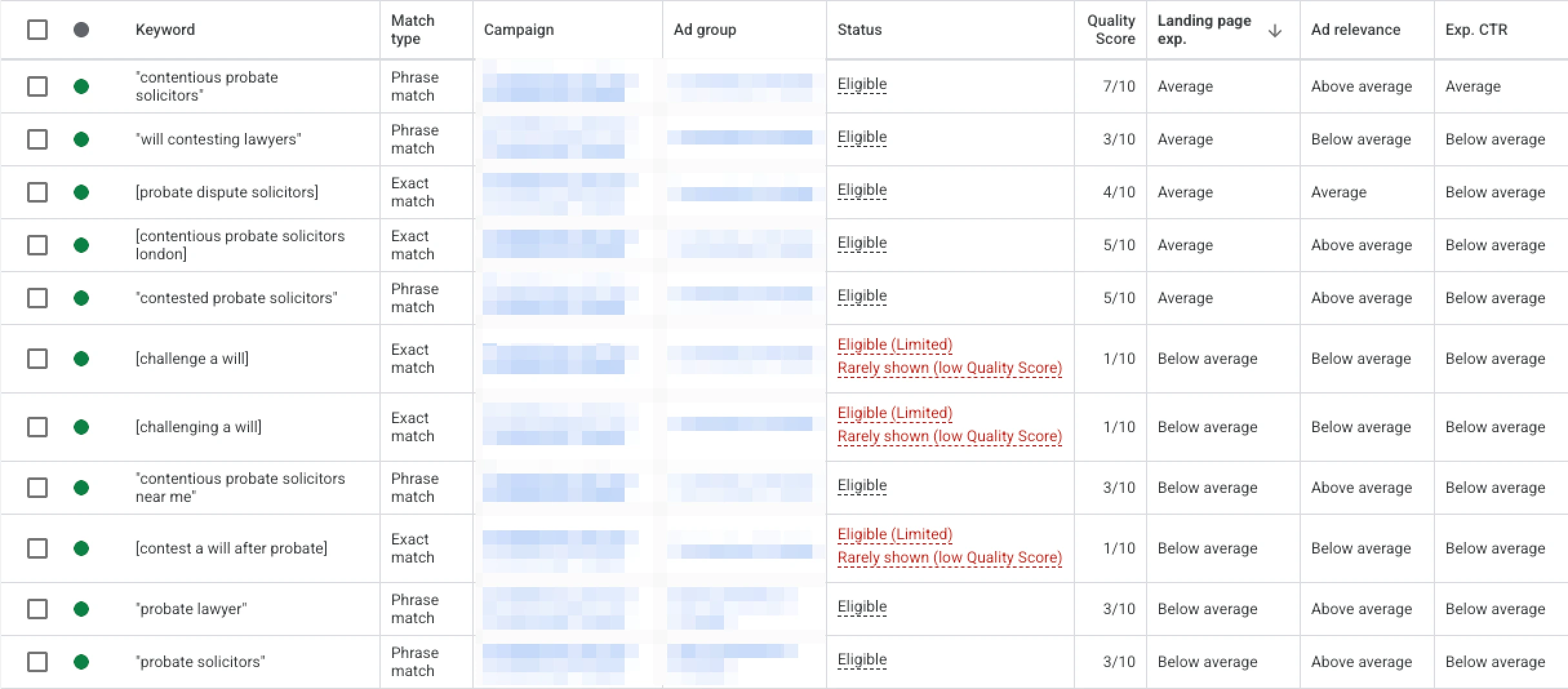
That is the same account a few weeks later, sorted by landing page experience. It is deliberately not the clean split described above, because the scores have already moved. Newly added keywords start cold and score badly before they have any history, which is worth knowing before you read any single snapshot as a verdict.
Speed was not the cause, and we checked rather than assumed. The page measured just over one second to largest contentful paint on throttled mobile, with no layout shift at all.
The real faults were duller than that. The page never described the service, and it gave the visitor no way to make contact without leaving the site.
If your Quality Score is stuck and you have already tuned keywords and ads, open the landing page experience column before you touch a bid. It is the third of the score that lives outside the ad account, which is exactly why it gets ignored by audits that only look inside the ad account.
Check 6: where the budget goes and what you are losing
Look at two numbers together. Impression share lost to budget tells you how much demand you are turning away. Impression share lost to rank tells you how much you are losing on quality and bid. They point at completely different fixes, and an audit that quotes one without the other is only half a diagnosis.
Lost to budget means the market wants more than you are buying. That is a spending decision.
Lost to rank means you are being outranked when you do compete. That is a Quality Score and bid decision, and often a landing page decision, which is why check 5 comes first.
Then split the spend by service line if your account covers more than one. Cost per lead averaged across a whole account is the number most likely to hide the decision you should be making.
We had one campaign running two service lines, one worth roughly seven times the other per client. Blended, the account looked like a single steady number. Split, one line cost nearly three times as much per lead as the other, and it was the cheaper-per-lead line carrying the far larger matters.
If a campaign covers services with different values to your business, report cost per lead per line. Otherwise you will keep funding the cheaper clicks by default.
Benchmarks are worth a glance here, with the same caution. WordStream by LocaliQ's 2026 Google Ads benchmark study, across 13,474 US search campaigns run between April 2025 and March 2026, put the average cost per lead at $66.69 and the average conversion rate at 8.18%. The legal category came in highest of all 23 industries, at $131.63 per lead against a $9.87 cost per click.
Those are US campaigns and US dollars, so read them as shape rather than as your number. Google's Keyword Planner will quote you a real cost per click range on your own keywords in minutes. For the wider UK picture behind these numbers, our breakdown of what Google Ads cost in the UK covers the benchmarks in detail.
Check 7: are the ads and assets doing any work
Open your responsive search ads and count the filled headline slots, then read them for genuine difference. Google allows 15 headlines and 4 descriptions. Most accounts fill them with the same claim rewritten, which gives the system nothing real to test and leaves the ad relevance component of Quality Score doing no work.
Two specific things to check that most audits miss.
Whether your ad copy contains the language of your keywords. If you bid on a term and no headline in the ad group contains anything close to it, expect a below average ad relevance rating. That link is mechanical. Google is matching strings, not forming an opinion.
Whether a claim in the ads is still true. Ad copy outlives the thing it describes. We found a claim running live in an account weeks after the change that made it false, and it was sitting in a sitelink rather than the ad, which is why a copy review had missed it twice.
A copy sweep that only reads the search ads is not a sweep. Assets attached at the ad group and campaign level are ads too, and they get read by real people.
Check 8: which settings are quietly leaking
Work through the campaign settings last, because they are the cheapest thing to fix and the least likely to be the real problem. That said, each one below costs money silently and none of them shows up in a performance report as a line item.
- Location targeting. Check whether it is set to Presence or to Presence or interest. The second is Google's default and it shows your ads to people merely searching about your area from anywhere in the world.
- Search partners and display expansion. Both are on by default on some campaign types. Segment your performance by network before deciding, because the answer genuinely differs by account.
- Ad schedule. Only worth restricting if you have enough data to see a real pattern. Most small accounts do not, and cutting hours on thin data just removes volume.
- Audience settings. Check whether audiences are set to observation or targeting. Targeting silently narrows who can see you, and it is easy to set by accident.
Fix these, but do not report them as the headline finding. An audit whose top recommendations are all settings changes is an audit that did not get to check 2.
What a free audit will not do
A free PPC audit is a sales document, and reading it as one makes it more useful rather than less. It exists to win your business, so it favours findings that are quick to produce and look urgent on a slide. That rules out the two checks that matter most.

Watch any thread where a business owner asks for help with their account. Nearly every reply offers a free audit. The word is doing double duty as a lead magnet, which is fine, as long as you know which one you are being handed.
A free audit usually checks
- Quality Score columns
- Missing negative keywords
- Unused ad extensions
- Empty headline slots
- Obvious settings
A real audit also checks
- Whether tracking measures a business outcome
- Which keywords produced actual leads
- Spend with no visible search term
- Whether bidding matches conversion volume
- Landing page experience scores
Everything in the left column is real. It is also everything that can be pulled from an account in 20 minutes without talking to you, which is precisely why it is free.
The right column needs your lead records, your definition of a good enquiry, and someone willing to tell you the problem is not in the ad account at all.
That last one is the honest test. The most useful thing an agency ever tells you is that the ads are working and something after the click is not. If an audit only ever reports on things the agency would be paid to fix, you have learned something about the agency rather than the account.
If you are auditing because you are weighing up a new agency, what should be in a PPC package covers what to ask before you sign.
How often to run one
Run a full audit every three to six months. More often than that and you are reacting to noise, because paid search data at small budgets takes weeks to say anything reliable. Three events override the schedule: a change of agency, a large budget change, and any change to tracking.
The tracking one catches people out. A new consent banner, a website rebuild or a tag manager change can break measurement without breaking anything visible on the page. The account keeps spending and the numbers keep arriving. They are just wrong.
What the output should look like
An audit is finished when it produces a ranked list of decisions, each with the expected effect and who does it. Not a list of metrics with a colour next to each one. If you cannot read the output and know what changes on Monday, the audit has described your account rather than diagnosed it.
At Njord Star we cap that list deliberately. Three to five changes, ordered by what they are worth, is more useful than 30 ordered by nothing.
That is not tidiness. A list of 30 findings gets you the same outcome as a list of none, because nobody knows which one to start with, and the account sits exactly where it was.
Start with check 1 this week. Open your conversion actions and read what each one actually counts. If any of them fires on something a visitor could do without meaning to, you have found your first real finding, and it was free.
An audit tells you where the account leaks. It does not tell you whether paid search can pay for itself in your market at all, which depends on what a client is worth to you. The Paid Search Validation runs that check on your own figures and live market data.